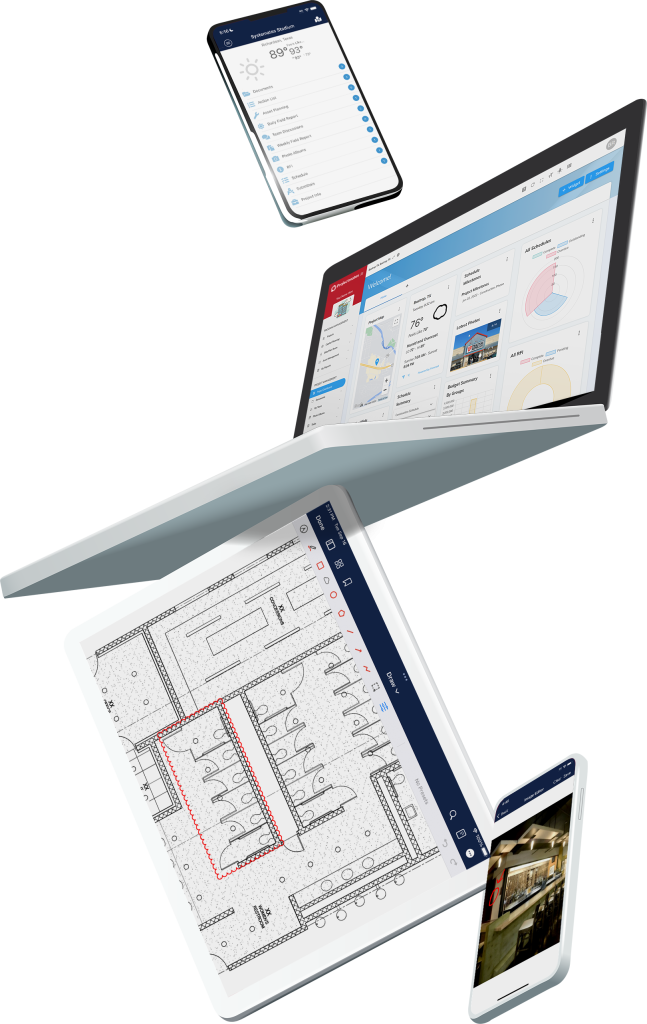

The construction document control tools in Projectmates enable your team to collaborate in real-time from anywhere. Whether it’s a CAD file or drawing set, your team can securely log in and review or make changes from any device. Because our platform features cloud document storage, your teams can have access to all the information they need for better decision-making and reduced errors on the jobsite.
Construction projects start well before breaking ground. You need a simple way to store and manage all of your documentation from project concept through closeout and beyond. With Projectmates, you don’t have to jump out of one software and into another just to access a document. All of your construction documents are securely stored in one place.
View 2D and 3D renderings using the built-in BIM viewer just like any other document—no plugins required. Your architect can share CAD files and BIM models with the entire team. Best of all, our 2D and 3D model viewer lets you markup and review CAD files just as you would on a PDF document.
As an Owner, you want to stay on top of any changes that are made. Projectmates automatically creates a file history log that allows you to see who’s been notified, has downloaded, or simply opened each revision. You’ll have the audit trail if anyone tries to use the old, “I didn’t get that file” excuse.
The construction document management tools have a version control feature to keep track of any revision. If there’s ever a dispute between your architect, general contractor, or any other party, you can easily see who made the revision and when they did it. It’s the best way to enhance stakeholder transparency across all teams.
Ensure every decision is backed by accurate, up-to-date project information.
Stay in control of your entire project portfolio. Get full visibility into document activity, version history, and team access — without chasing down files or fielding "did you get that?" emails.
Share CAD files, BIM models, and design sets with the full project team — with built-in markup tools and version control so nothing gets lost in email chains.
Access the latest drawings and specs from the field on any device. No more working off outdated plans or waiting on document approvals to keep work moving.
Get quick, secure access to the documents that matter to your scope of work — without sifting through everything else. Shareable links mean no login required for one-off collaborators.
Maintain security and control with robust permission settings, audit trails, and SOC 2 Type II certified infrastructure — so sensitive project data is always protected.
Your office-bound architects and GC’s in the field can open, review, and markup on the same PDF in real time to address any issues or clarifications. This feature ensures your team stays up-to-date and on-task while reducing revision delays and maintaining a single source of truth.
View, modify, and markup your 3D project files just like you can with a PDF without having to use a BIM and CAD file management plugin. Review layers, walkthrough, and comment on BIM models with ease in the Projectmates App.
Join the teams who’ve eliminated printing costs, reduced delays, and kept every project on track — all from one platform.
Bring external team members into the mix with the ability to quickly email a document link from the Projectmates app. Simply drag and drop any file to create a shareable link. You can also control how long that link stays active. Permission control helps maintain secure and efficient real-time collaboration with external stakeholders, which is especially important on public sector projects.
Protip: You can even add documents to a project just by emailing them to a targeted folder.



An Owner’s construction project management system needs to reflect their unique business needs. That should include the way it manages and stores your documents. Projectmates’ document management system is fully configurable to fit your organizational needs. Easily modify document navigation by phase, division, or whatever works best for your organization. You’ll gain features such as:
Remote access to all documents on any device
Simply upload with drag and drop
Highly customizable file and folder structure
Fast folder download
Comment on files and folders
Use email to send or receive files from the application
Real-time collaborative PDF markups
CAD viewer with X-Ref support
Real-time collaborative PDF markups
DocuSign approvals for documents
Supports all file types, with built-in version control
Robust audit trail tracking and logs
Critical watch folders
Keywords and labels augment built-in search
Construction Management in the Digital Age: Why Manual Processes Are Holding You Back
“What we noticed was within 12 months we had eliminated all the printing and shipping costs, except for permit sets, within our process. A typical project was spending about $45,000 just to print and ship documents.”

Projectmates construction workflow automation gives Owners and developers a powerful solution for managing their critical documentation with security, collaboration, and compliance. To learn more about what our construction document management software can do to enhance your next project, reach out to our team today to schedule a demo.
Try Projectmates Free and See the Difference
Get hands-on access to dashboards, workflows, and reporting—exactly what your team will use day to day.