From the Author
I spent years on the Owner’s side of the table, managing capital programs, navigating contractor disputes, and trying to make sense of budgets that lived across a dozen spreadsheets. When our organization finally made the move to a PMIS, I led that transition from the inside: identifying what wasn’t working, confronting years of accumulated workarounds, and building something better while projects were still in motion. I’ve seen what it costs when the transition goes wrong, and what’s possible when it doesn’t. This guide exists because Owners deserve a practical roadmap, not just a product promise.
At some point, every Owner running a capital program on spreadsheets and email chains hits the same wall.
It usually isn’t one catastrophic failure. It’s the accumulation. A budget discrepancy traced back to three different versions of the same Excel file. A contractor dispute with no clear audit trail. A missed submittal that nobody can prove was ever sent. A monthly executive report that takes three days to assemble and is already outdated by the time it’s distributed.
None of these are edge cases. They’re what happens when the complexity of a capital program outgrows the tools holding it together.
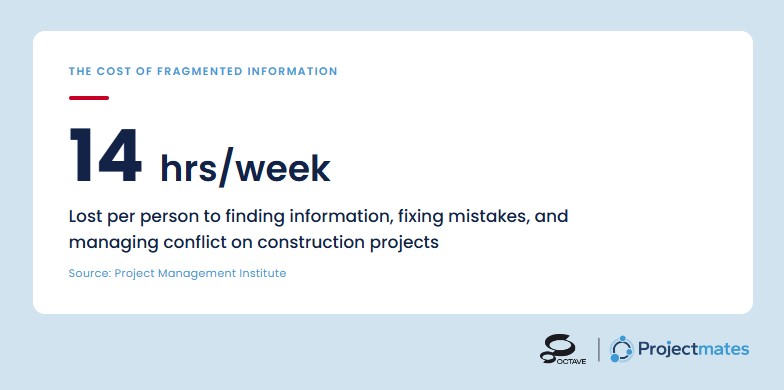
A Project Management Information System — a PMIS — changes that equation. But adopting one isn’t just a software purchase. It’s an organizational transformation. Done right, it turns fragmented paper processes into a single source of truth that your entire project ecosystem can rely on. Done wrong, it becomes an expensive system that half your team ignores while the other half keeps using email.
This guide is for Owners who want to do it right.
Phase 1: Understanding What You're Really Buying
What Should Construction Owners Look for in a PMIS?
A PMIS is the connective tissue between every party on a capital project: Owner, general contractor, design team, subcontractors, and inspectors, unified in a single platform where data flows in real time. It’s not a scheduling tool or a document repository. For Owners, it’s a governance platform: oversight of the job, not just participation in it. The right questions aren’t about what the system can do. They’re about what it gives you control over.
The Owner’s Lens: What to Prioritize
- Budget and cost control: When a change order comes in, can you see what it does to your total program cost before you approve it, without calling your contractor first?
- Contract management: When a dispute surfaces, can you pull the full contract history in minutes, every change, every approval, every signature?
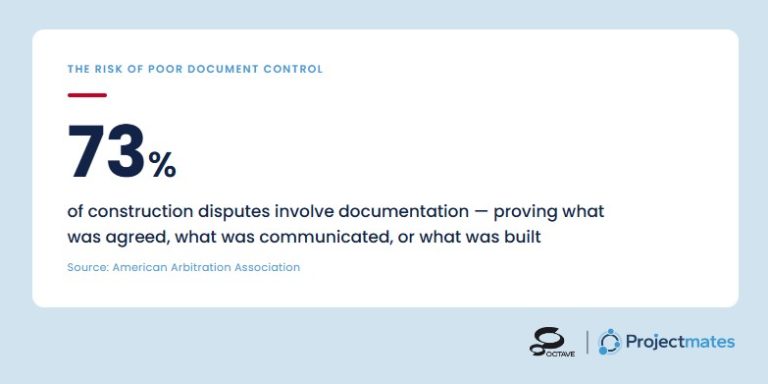
- Document control: Three months into construction, when a contractor claims they never received the updated spec, can you prove otherwise in under a minute?
- Schedule integration: When a contractor tells you the project is on schedule, can your system confirm it, without waiting for their update to land in your inbox?
- Reporting and dashboards: When your board asks for a program status update, is the answer ready, or does someone spend the next three days building it?
- Multi-project portfolio view: If you’re running six projects simultaneously, can you tell at a glance which ones need your attention today, and which ones don’t?
Many PMIS platforms are built from a contractor’s perspective and optimized for field execution rather than Owner governance. Evaluate carefully whether the system gives you the oversight layer you need, or whether it simply puts your GC’s workflows in front of you.
At Projectmates, this distinction sits at the foundation of how the platform was built. The workflows, the reporting structure, the permission layers: all of it is designed around the Owner’s governance role, not the contractor’s execution role. It’s a different starting point, and it produces a different system.
Beyond features, evaluate the ecosystem. Does the platform integrate with your ERP or financial system? Will your contractors and consultants actually adopt it, or will you end up managing a hybrid of the system and the old email chain? The best platform in the world fails if your contractors are still sending change orders by email. Vendor support during rollout isn’t a nice-to-have. It’s what separates adoption from abandonment.
Phase 2: The Selection Process
How Should Construction Owners Evaluate and Select a PMIS?
A disciplined PMIS selection process has five stages: requirements definition, RFI, scripted demos, reference checks, and contract negotiation. Most Owners skip straight to the demo, sign a contract, and spend the next eighteen months with a system that looked great in the conference room but doesn’t match how their projects actually run.
- Define your requirements. Before you talk to a single vendor, document your current workflows, your pain points, and your non-negotiables. This isn’t a wish list. It’s a filter. Every vendor will tell you their platform can do what you need. Your documented requirements are what keep you from believing them without proof.
- Issue an RFI. Cast a wide net. A formal Request for Information lets vendors self-select by responding to your specific requirements rather than pitching their standard capabilities deck. The responses alone will tell you a lot: which vendors read carefully, which ones sent a template, and which ones clearly work with Owners like you.
- Shortlist and script your demos. A vendor-led demo is a performance. A scripted demo is a test. Give your shortlisted vendors a scenario built around a real project: a contested change order, a submittal backlog, a budget variance that needs to be traced to its source. Watch how the platform handles your workflows, not their showroom ones. If a vendor pushes back on a scripted demo, that’s worth noting.
- Check the Right References. Ask specifically for Owner references on projects of similar size and complexity to yours. Not GC references. Not case studies. Owners who have lived with the platform for at least a year and can speak to what support looks like when something breaks mid-project, not just what onboarding felt like.
- Negotiate before you sign. The contract conversation isn’t just about price. Lock in implementation timelines, training commitments, service level agreements, and, critically, data portability rights. If you ever need to leave the platform, your project data belongs to you. Make sure the contract says so explicitly.
Questions to Ask References
- How long did implementation actually take versus what was promised?
- Did your contractors resist adoption, and how did the vendor help you manage that?
- What does support look like when something breaks mid-project?
- What would you configure differently if you started over?
- Would you select this platform again?
Phase 3: Establishing the System
How Do You Implement a PMIS Without Derailing Active Projects?
Successful PMIS implementation requires a phased go-live, role-specific training, and a deliberate decision to rethink workflows rather than digitize broken ones. Skip any of those and you get the same result most organizations get: half the team reverted to email six months in, and a system full of half-completed submittals.
Before You Configure Anything
Resist the urge to mirror your old processes in the new system. This is the opportunity to rethink workflows, not just digitize the problematic ones. Convene a small working group: a project controls lead, an Owner’s rep, and a representative contractor, to map the ideal-state process for each module before a single field is configured.
Configuration Over Customization
There’s a meaningful distinction between configuring a PMIS to match your workflows and customizing it at the code level. Heavy customization creates technical debt that makes upgrades painful and support difficult. Wherever possible, adapt your workflows to fit the platform’s native capabilities, then configure the platform’s settings to suit your organization.
Phased Go-Live by Module
Don’t go live on every module simultaneously. A typical sequence for an Owner:
- Phase 1: Document control, drawing management, submittals, foundational workflows with project team visibility.
- Phase 2: RFI management, meeting minutes, daily reports, collaborative workflows that build adoption habits.
- Phase 3: Budget control, change management, contract administration, the high-stakes financial workflows.
- Phase 4: Reporting, dashboards, integrations, the intelligence layer, once clean data is flowing.
Training is not a one-hour webinar. Different roles need different training. Role-based sessions delivered close to go-live, using real project data, produce dramatically better adoption than generic onboarding months before anyone needs the system.
The implementation approach at Projectmates reflects this directly. Every deployment is phased, every training plan is role-specific, and every go-live is supported by an implementation team that has been through this transition with Owners, not just with software.
Phase 4: Managing the System
How Do You Keep a PMIS Performing After Go-Live?
A PMIS is not a set-it-and-forget-it investment. It requires three things to keep performing: data discipline to maintain reporting integrity, regular system audits to catch adoption gaps, and a structured feedback loop so the platform evolves with your organization.
Data Discipline Is Everything
The intelligence your PMIS produces is only as good as the data entered into it. Inconsistent coding, duplicate records, incomplete fields, and workflows that bypass the system entirely corrupt the reporting you built the system to produce. Establish and enforce data standards: cost code structures, naming conventions for documents, required fields before an item can be submitted or closed. The goal is a system configured so that doing it right is easier than doing it wrong.
Regular System Audits
Schedule quarterly audits of system health. Are all active contractors submitting documentation through the platform? Are RFI response times improving or degrading? Are there modules that have gone unused for 90 days? These audits aren’t punitive. They’re diagnostic. They tell you where adoption has slipped, where configuration needs revisiting, and where additional training is needed.
Close the Feedback Loop
The people using your PMIS daily will find workflow gaps, friction points, and feature needs that your implementation team never anticipated. Create a structured channel to capture that intelligence and route it to your system administrator. The platform should evolve with your organization’s needs, not calcify at the configuration you set on launch day.
Phase 5: Where PMIS Discipline Pays Its Biggest Dividend
How Does a PMIS Improve Construction Project Closeout?
A well-managed PMIS turns closeout from a scramble into a straightforward exercise. Financial records are exportable, not reconstructed. Documents are archived and version-controlled throughout the project, not hunted down at the end. Every change order, approval, and signature has an audit trail before closeout begins.
For Owners, closeout is often where the real cost of poor process discipline surfaces. Contracts that were never fully executed. Change orders approved over email and never formally logged. Punch list items scattered across spreadsheets, texts, and someone’s notebook. When it’s time to close out a $40 million project, hunting down that paper trail isn’t just frustrating. It creates real legal and financial exposure.
Financial Closeout
When every contract, change order, allowance, and cost code has been maintained in real time, financial closeout becomes a straightforward exercise. You’re not reconstructing the budget history. You’re exporting it. Disputed amounts have an audit trail. Retainage releases are documented. Final lien waivers are where they’re supposed to be.
Document Closeout
Drawings, specifications, submittals, warranties, and O&M manuals are among the most time-consuming elements of closeout when managed manually. In a disciplined PMIS, most of that work is done before closeout begins. Every document has been version-controlled, reviewed, and archived throughout the project lifecycle. Final assembly is a reconciliation, not a rescue operation.
Punch List and Substantial Completion
Punch list tracking moves faster when items are logged, assigned, and closed in the system rather than managed through a chain of site visit emails. Accountability is clear. Nothing falls through the cracks because there are no cracks.
Handover to Operations
A complete, searchable record of every decision, every change, and every approved document doesn’t just close the project. It becomes a permanent institutional asset. When a facility manager needs to know what spec was used on the HVAC system three years from now, or when a dispute surfaces over what was approved in change order 14, the answer is in the system.
That’s the real promise of a PMIS done right. Not just a better way to manage construction. A better organization on the other side of it.
From the First Sketch to the Final Closeout
The transition from manual processes to a fully realized PMIS is not a weekend project. It requires leadership commitment, disciplined implementation, organizational patience, and continuous stewardship. The payoff, for Owners especially, is transformational: fewer disputes, faster decisions, cleaner audits, real-time budget visibility, and a capital program that runs on information rather than intuition.
The pen still matters, for the vision, the sketch, the signature. But between that first mark and the certificate of occupancy, a lot can go wrong. Your program deserves something better than paper to hold it together.
That’s what Projectmates is built to be: not just a place to store project documents, but the operational backbone of how Owners govern, manage, and close out capital programs with confidence. If you’re ready to stop managing by instinct and start managing by information, let’s talk about what that transition looks like for your program.