Selecting construction management software is one of the most consequential decisions Owners make for a capital program. The wrong choice compounds risk: Dodge Construction Network data shows 61% of construction projects face schedule delays and 49% run over budget. The right platform unifies your teams, sharpens your forecasting, and gives you clear, real-time control over every dollar and deadline.
For institutional Owners managing multi-project capital programs, Projectmates delivers an Owner-focused platform that brings budgeting, forecasting, and collaboration into a single source of truth. This article covers the seven most important factors to evaluate before you decide.
How We Chose the Evaluation Criteria for Construction Software
Institutional Owners face challenges that general contractors and subcontractors don’t. You’re accountable to stakeholders, boards, and funding agencies. You need to balance long-term capital plans with day-to-day project execution. And you’re often coordinating dozens of external vendors across multiple active projects.
We developed these seven criteria based on what matters most to Owners managing capital programs:
- Full lifecycle coverage: Does the software handle everything from planning through closeout?
- Budget and forecast integration: Can you track estimated, committed, and actual costs in real time?
- Portfolio-level reporting: How easily can you see the health of your entire program at a glance?
- Stakeholder collaboration: Does the platform connect internal teams with external partners efficiently?
- Document control: Is there a single source of truth for all project files, drawings, and contracts?
- Security and compliance: Does the vendor meet enterprise security standards like SOC 2 Type II?
- Implementation and support: Will the vendor guide your team through adoption and ongoing use?
The 7 Things Institutional Owners Should Know
1. Projectmates: The Owner-Focused Platform for Capital Project Management
Projectmates is cloud-based construction management software designed specifically for Owners, developers, and institutions. Unlike platforms built primarily for contractors, Projectmates puts Owner priorities first: budget oversight, stakeholder transparency, and multi-project coordination.
The platform manages the entire project lifecycle from concept to closeout. You can plan and prioritize your capital plan against funding sources, track every contract and change order against your budget, and generate stakeholder reports without exporting data to spreadsheets.
With more than 100,000 active projects currently running on the platform, Projectmates has supported the construction industry for over 20 years.
Projectmates Features
- Capital planning: Plan, prioritize, and optimize your capital plan against funding sources, with CIP-level scheduling and what-if scenario planning built in
- Full-cycle cost tracking: Monitor budgets, commitments, change orders, pay applications, and actuals in one connected view
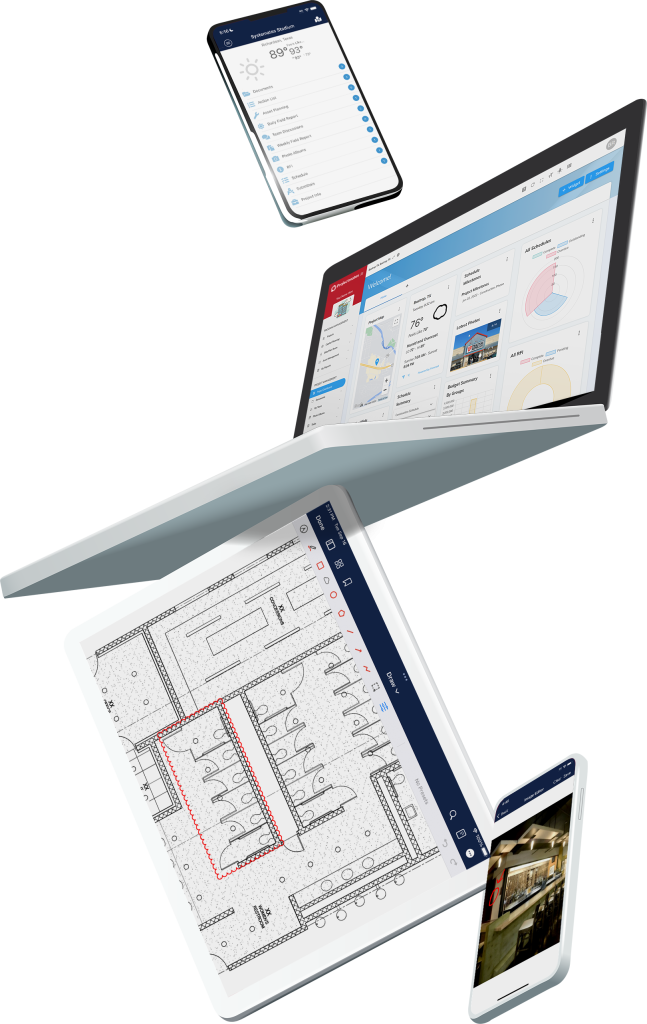
- Real-time dashboards: Build custom dashboards to track KPIs across your entire portfolio without waiting on manual report compilation
- Centralized document management: Store all drawings, contracts, and correspondence in one searchable location with version control and audit trails
- Configurable workflows: Match the software to your processes for RFIs, submittals, change orders, and approvals rather than forcing your team to adapt
- TX-RAMP Level 2 certification: Meet the security requirements of government and institutional clients with enterprise-grade data protection
Projectmates Pros and Cons
Pros:
- Purpose-built for Owners and capital program managers rather than general contractors
- In-house implementation team guides your organization through software adoption
- US-based customer support with zero wait time for assistance
Cons:
- Organizations with very simple, single-project needs may not require the full feature set
- Teams new to PMIS platforms will benefit from taking advantage of the training resources available
- Initial configuration takes time to match your specific workflows, though this investment pays off in long-term usability
2. Owner-Centric Design: Why Software Built for Owners Outperforms Contractor-Focused Tools
Construction software built for general contractors and field teams excels at jobsite coordination, daily logs, and subcontractor management. But it often lacks what Owners need most: funding source tracking, governance controls, and stakeholder reporting.
Owner-centric software gives you workflows built around your accountability structure. Projectmates, for example, includes built-in approval routing that matches how Owners make decisions. You can require multiple sign-offs on change orders above certain thresholds, track who approved what and when, and create audit trails that satisfy board members and funding agencies.
Owner-Centric Design Features
- Stakeholder dashboards: Give board members and executives view-only access to project status without exposing sensitive operational details
- Funding source alignment: Track how bond funds, grants, and operating budgets flow into specific projects
- Multi-tier approval workflows: Route contracts, change orders, and invoices through your organization’s approval hierarchy automatically
Owner-Centric Design Pros and Cons
Pros:
- Reduces the workarounds needed when adapting contractor tools for Owner use
- Includes governance and compliance features that institutional Owners require
- Speeds up stakeholder reporting cycles by consolidating data in one platform
Cons:
- Field teams accustomed to contractor-focused interfaces may need orientation to the Owner perspective
- Some features designed for institutional Owners may not be relevant to private developers with simpler reporting needs
- Integration with contractor-specific tools may require additional configuration
3. Real-Time Budgeting: Track Committed Costs, Forecasts, and Actuals in One View
Budget management on capital programs isn’t a static exercise. Costs shift as change orders accumulate, invoices arrive, and forecasts change. If your budgeting lives in spreadsheets, you’re always working with outdated numbers.
Real-time budgeting software connects your budget directly to contracts, change orders, and pay applications. When a contractor submits an invoice, the actual cost updates automatically. When you approve a change order, the committed cost adjusts in the budget. This clarity helps you spot cost overruns early, before they become unrecoverable.
Real-Time Budgeting Features
- Linked relationships: Contracts, change orders, and invoices all connect back to the budget line item automatically
- Forecast versus actual tracking: See anticipated costs alongside committed and actual amounts in one dashboard
- Automated retainage calculations: Track withheld amounts without manual spreadsheet formulas
Real-Time Budgeting Pros and Cons
Pros:
- Eliminates the risk of double payments or overpayments caused by spreadsheet errors
- Gives finance teams confidence in budget reports without manual reconciliation
- Reduces the time spent preparing monthly cost reports for stakeholders
Cons:
- Requires discipline from the team to enter data consistently and on time
- Organizations with highly customized budget structures may need configuration support
- Initial data migration from legacy spreadsheets requires careful validation
4. Multi-Project Control: Manage Portfolios Without Spreadsheet Chaos
Institutional Owners rarely manage just one project at a time. You might have a dozen active construction projects, another dozen in design, and a backlog of planned work waiting on funding. Tracking all of this across disconnected spreadsheets and email threads creates blind spots.
Multi-project control means seeing the health of your entire portfolio in one view. Projectmates’ dashboard tools let you identify which projects are on track, which are at risk, and where your capital dollars are committed. That portfolio-level view helps you make better decisions about resource allocation and project prioritization.
Multi-Project Control Features
- Portfolio dashboards: View budget status, schedule health, and risk indicators across all active projects simultaneously
- Drill-down capability: Click from the portfolio view into individual project details without switching applications
- Automated report delivery: Schedule weekly or monthly portfolio summaries to your inbox or cloud storage
Multi-Project Control Pros and Cons
Pros:
- Identifies at-risk projects before small issues become major problems
- Reduces executive prep time for board meetings and stakeholder updates
- Supports strategic decisions about which projects to accelerate or defer
Cons:
- Portfolio insights depend on consistent data entry across all projects
- Users may need training to build effective custom dashboards
- Very large portfolios may require thoughtful dashboard design to avoid information overload
5. Forecasting Accuracy: Use Historical Data to Predict Future Project Performance
Forecasting is where experienced construction professionals separate themselves from the pack. But even the most experienced project managers benefit from data. When you can analyze how past projects performed, you can predict how future projects will behave.
Projectmates stores all your project data in a structured format. That means you can analyze change order trends, identify vendors who consistently run over budget, and understand which project types carry the most schedule risk. Over time, your forecasts get sharper because they’re grounded in your organization’s actual performance history.
Forecasting Accuracy Features
- Historical data analysis: Review past project performance to inform future budget and schedule estimates
- Change order trending: Identify patterns in scope changes to build more accurate contingency budgets
- Vendor performance tracking: Evaluate contractor reliability across multiple projects over time
Forecasting Accuracy Pros and Cons
Pros:
- Builds institutional knowledge that persists even as staff members change
- Supports more accurate budget requests to boards and funding agencies
- Helps identify systemic issues that may not be visible on individual projects
Cons:
- Meaningful historical analysis requires several years of accumulated project data
- Organizations must maintain consistent data entry practices over time
- Custom analysis may require familiarity with the reporting tools
6. Collaboration Workflows: Connect Internal Teams and External Partners in One Platform
Construction projects involve many parties: architects, engineers, general contractors, specialty contractors, inspectors, and Owner representatives. When communication happens across email, phone calls, and different software systems, information gets lost.
Projectmates brings all project communication into one platform. RFIs, submittals, daily field reports, and meeting minutes all live in the same system. External partners can access the documents and workflows relevant to their scope without needing separate logins for every Owner they work with. This reduces delays caused by missing information or miscommunication.
Collaboration Workflows Features
- RFI and submittal tracking: Route requests through approval workflows with automatic notifications and due date reminders
- External partner access: Give contractors and consultants permission-controlled access to relevant project areas
- Document sharing: Generate shareable links for files without requiring recipients to create accounts
Collaboration Workflows Pros and Cons
Pros:
- Reduces the back-and-forth of chasing information through email chains
- Creates clear accountability with timestamps and audit trails on all communications
- Improves response times on RFIs and submittals by automating notifications
Cons:
- External partners may need brief orientation to the platform’s interface
- Success depends on all parties using the system consistently rather than falling back to email
- Complex approval chains may require thoughtful configuration during implementation
7. Data Security and Compliance: Protect Sensitive Project Information with Enterprise-Grade Controls
Construction data includes sensitive financial information, proprietary designs, and personally identifiable information about project participants. Government and institutional Owners often face additional compliance requirements around data handling and storage.
Projectmates meets enterprise security standards including SOC 2 Type II certification and TX-RAMP Level 2 certification for Texas state agencies. The platform includes role-based permissions, audit trails, and encryption to protect your project data. For Owners who must demonstrate compliance to auditors and oversight bodies, these security features aren’t optional.
Data Security Features
- Role-based permissions: Control who can view, edit, and approve different types of project information
- Audit trails: Track every action taken in the system with timestamps and user identification
- SOC 2 Type II certification: Verify that the platform meets industry standards for security controls
Data Security Pros and Cons
Pros:
- Satisfies audit and compliance requirements for government and institutional Owners
- Protects sensitive financial and design information from unauthorized access
- Provides documentation for legal disputes or claims through detailed audit trails
Cons:
- Permission configuration requires thoughtful planning during implementation
- Organizations with unique compliance requirements should verify coverage with the vendor
- Security features add some administrative overhead for user management
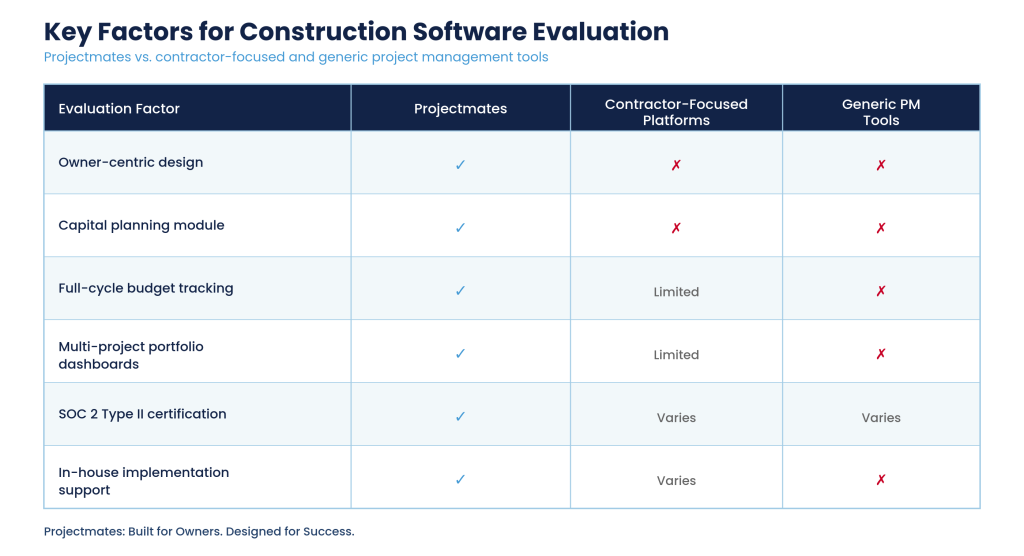
Comparison Table: Key Factors for Construction Software Evaluation
How Do Construction Budgeting and Forecasting Tools Integrate with Existing Systems?
Institutional Owners typically already run ERP systems, accounting software, and scheduling tools. A new construction management platform should connect to those systems rather than create another data silo.
Projectmates integrates with modern ERP systems, including the accounting platforms most Owners rely on. You can push financial data from Projectmates to your accounting system for payment processing, then pull check information back into Projectmates to close the loop. This two-way integration eliminates double entry and keeps your budget data accurate across systems.
The platform also supports integration with scheduling tools like Primavera and Microsoft Project. You can import schedule data to align milestones with budget tracking, giving you a coordinated view of cost and time performance. For organizations with specialized needs, Projectmates offers API access for custom integrations.
What Should Owners Look for During the Implementation Process?
Software implementation is where many platforms fail to deliver on their promises. A vendor may have impressive features, but if your team can’t adopt the system effectively, those features are worthless.
Look for vendors with dedicated implementation teams who will guide your organization through setup, data migration, and training. Projectmates maintains an in-house implementation department that works directly with clients. This means the people configuring your system understand both the software and your organization’s needs.
Implementation should cover your workflows, migrate your historical data, and train every user group. The vendor should also offer ongoing support after go-live, because questions and optimization opportunities will keep coming up as your team gains experience with the platform.
Why Projectmates Is the Right Choice for Institutional Project Owners
Institutional Owners need software that matches their accountability structure, not tools designed for a different audience. Projectmates delivers Owner-focused features for budget management, stakeholder reporting, and multi-project oversight.
The platform’s 20+ years serving the construction industry means your organization benefits from proven workflows and battle-tested reliability. With TX-RAMP Level 2 and SOC 2 Type II certifications, Projectmates meets the security requirements of government and institutional clients. And with US-based customer support and an in-house implementation team, you get the guidance you need to succeed.
If you’re evaluating construction management software for your capital program, Projectmates gives you the tools to build smarter, faster, and more efficiently. Request a demo to see how the platform can support your organization’s needs.
FAQs About Construction Budgeting, Forecasting, and Collaboration Software
Capital project management software is a platform that helps Owners plan, fund, and execute large construction programs. Projectmates gives you tools to track costs across multiple projects and report progress to stakeholders. The software typically covers the full project lifecycle from initial planning through construction closeout.
Construction budgeting software tracks project-specific costs like contracts, change orders, and pay applications in real time. Accounting software processes payments and manages your organization’s general ledger. Projectmates integrates with accounting systems so you can push financial data for payment processing while maintaining detailed project-level budget tracking.
SOC 2 Type II certification shows that a vendor maintains effective security controls for protecting client data. For government Owners in Texas, TX-RAMP certification indicates compliance with state security requirements. Projectmates holds both certifications, giving institutional Owners confidence that their project data is protected.
Yes. Multi-project portfolio management is a core capability of Owner-focused platforms. Projectmates lets you view budget status, schedule health, and risk indicators across your entire program in one dashboard. You can drill into individual projects while maintaining a coordinated view of your full portfolio.
Implementation timelines vary based on organizational complexity and data migration requirements. Projectmates’ in-house implementation team works directly with clients to configure workflows, migrate data, and train users. Most organizations can begin using the platform within a few months, with ongoing optimization as teams gain experience.